Prepare your television
Check that your TV or box runs Android TV or Google TV and is connected to the internet. Have your authorised M3U playlist, compatible file or Xtream Codes details ready. LynoTV supplies no channels or IPTV subscription. Local use does not require a LynoTV account.
Install from Google Play
- Open Google Play on your TV and search for LynoTV.
- Check the official listing, also linked from the download page.
- If available for your device, select Install, then Open.
If the listing is unavailable, review the APK instructions below. Store unavailability does not guarantee APK compatibility.
Install the official APK
- Download the APK from the official download page using a browser, or transfer it to your TV using your file manager.
- Open the file. If prompted, temporarily allow installation from that application only. Settings names vary by device.
- Confirm installation, open LynoTV and disable the installation permission again.
If installation fails, check the download and the compatibility information on the official page. Avoid modified APKs. Do not uninstall an existing copy without planning how to preserve your data.
Add M3U or Xtream Codes
In the add-source flow, select the type matching your details. For M3U, name the source and enter its URL or select the file. For Xtream Codes, enter the server address, username and password. Check for extra spaces introduced by the TV keyboard before confirming.
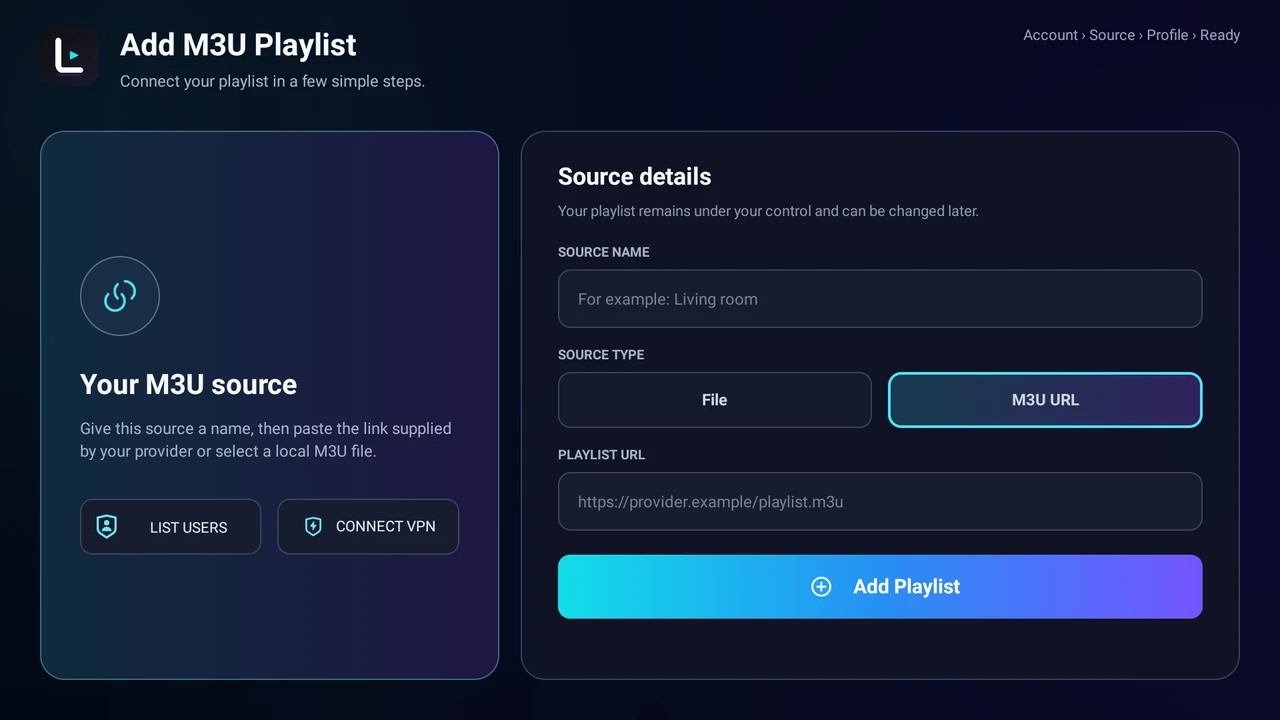
Actual LynoTV 1.2.0 screenshot in English. Layout and labels may vary by language and installed version. No real credentials are shown.
Follow the detailed M3U playlist guide or Xtream Codes guide. Never share credentials with support or in a public screenshot.
Check playback with your remote
Wait for the import to finish. Use the directional buttons to browse categories and select an authorised programme. Check video, sound and returning to the list. TV guide listings depend on your source’s EPG data: an empty guide does not necessarily prevent playback.
If the list stays empty or playback fails, check the source and connection, then follow the playback troubleshooting guide. Record the error message without sharing access details.
Choose your options
All plans are free of LynoTV advertising. Local use is available without an account. LynoTV Play and LynoTV Play Sync offer different features: check the current plans before activating an option. Play Sync requires explicit consent and does not copy videos or catalogues.
Find more procedures in the LynoTV guides.